The Complete Guide to AI Real Estate Photo Editing
"AI photo editing" gets thrown around loosely enough that it's worth being precise about what it actually means for a real estate listing photo — because the honest answer is that it covers a few genuinely different things, and knowing which one you're using changes how you should use it.
Two different things people mean by "AI editing"
The first is AI-assisted correction — a model looks at your photo, figures out what's off (underexposed interior, blown-out window, flat color), and adjusts brightness, contrast, white balance, and sharpening accordingly. Nothing is added or removed from the photo. It's the same job a photo editor does by hand with sliders, just done by a model that's analyzed the specific image instead of applying a blanket preset.
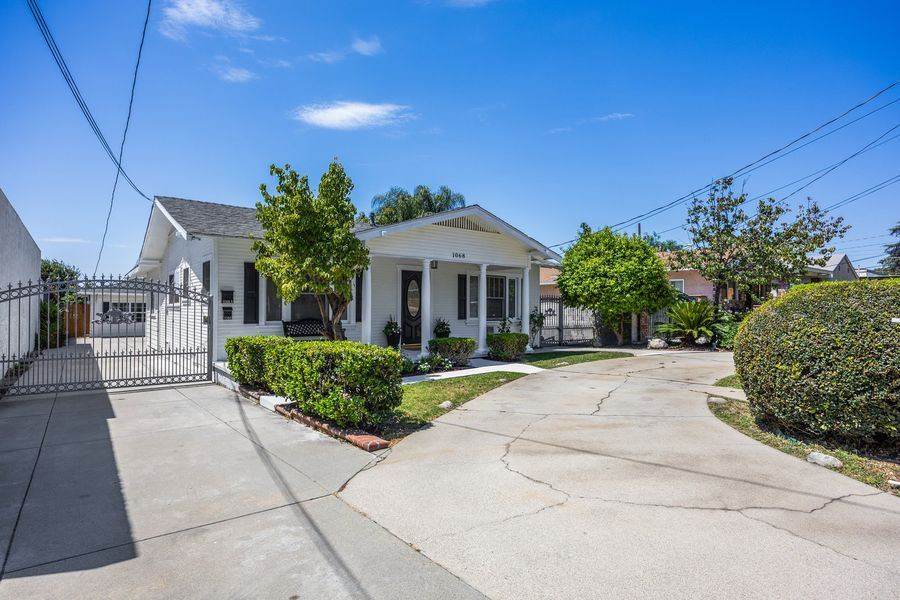
The second is AI-generated editing — replacing or adding something that wasn't fully there: swapping an overcast sky for a clear one, turning a daytime exterior into a twilight shot, furnishing an empty room, or removing clutter from a driveway. This is genuinely generative — the model is creating plausible pixels, not just adjusting existing ones.
Both are useful. They're just not interchangeable, and mixing them up is where a lot of "AI-edited" listings start to look uncanny.
Where correction is the right call
If a photo is fundamentally well-composed and well-shot but suffers from a technical issue — dim lighting, a color cast from tungsten bulbs, low contrast — correction is the right tool. It's fast, it's cheap, and because it's not inventing anything, there's essentially no risk of it looking fake. This is the kind of edit that should happen on every photo in a listing set, not just the hero shots.
Where generative editing earns its cost
Generative edits solve a different problem: the photo was taken on the wrong day, at the wrong time, or in the wrong condition, and reshooting isn't realistic. A grey sky on shoot day. A twilight shot the schedule never allowed for. An empty room that's a hard sell unfurnished. These aren't things you can fix with sliders — the information just isn't in the original photo.
The mistake that makes AI editing look fake
Almost every "that looks obviously AI-edited" reaction comes down to the same thing: over-editing. A sky replacement with lighting that doesn't match the rest of the scene. Staging furniture at a scale or angle that doesn't fit the room's real perspective. Twilight glow coming from windows that don't actually have interior lights near them in the original shot.
The fix isn't avoiding AI editing — it's holding it to the same standard you'd hold a manual edit to: does the lighting direction match across the whole frame? Does the perspective make sense? Would a careful buyer, standing in that actual room, see something that contradicts the photo? If yes, dial it back.
A practical workflow
- Correct every photo first. Exposure, contrast, color — this is the foundation, and it should happen before anything generative.
- Reserve generative edits for photos that need them. Not every exterior needs a sky swap. Not every listing needs a twilight shot. Use it where the original photo genuinely can't do the job otherwise.
- Check consistency across the set. If one photo is twilight and the rest are midday, make sure that's clearly a distinct "dusk view" rather than looking like a mismatched edit.
- Keep at least one honest daylight exterior. Buyers want to know what the property actually looks like on a normal day, not just its best-case rendering.
Disclosure matters more than people think
Most MLS and marketing guidelines already expect virtually staged or digitally altered photos to be labeled as such. This isn't a legal footnote to skip — it protects the agent, the seller, and the buyer's trust in the rest of the listing. Label twilight conversions, sky replacements, and virtual staging clearly. It costs nothing and it's the difference between "professional" and "misleading."
Try AI photo editing on your own listing
Rawport AI includes correction, sky replacement, virtual twilight, decluttering, lawn replacement, and virtual staging — 5 free credits to start, no card required.
Try It Free